X-ERP.factory – Modern operational data collection for production
X-ERP.factory brings orders, work steps, quantities and times directly to the point of value creation - clear enough for the shop floor, precise enough for planning and post-calculation.
Every second counts on the shop floor. Nobody wants to wander through menus when materials, machines and teams are in motion.
A simple moment for the user
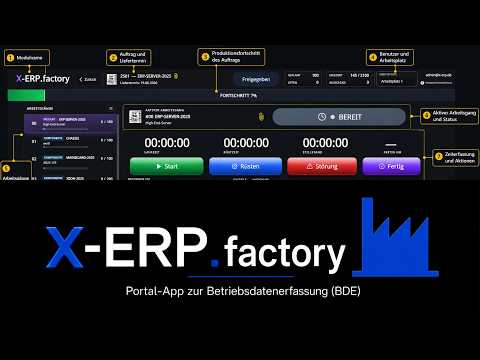
The production data collection reduces the view to relevant production orders and messages. Good device mapping, clear steps, large controls and immediate feedback make the process quick and yet verifiable.
This is how the process works
- Log in in person or at a clearly assigned workstation.
- Select the order, production step and, if necessary, resource via number, list or search.
- Start work and check visible status.
- Accurately record yield, scrap, time and required notes.
- Don't finish the step until the result is complete.
- Control progress and follow-up processes in X-ERP.
How you can recognize a good portal process
- Order, item and step are correct.
- Start/end and quantities are plausible.
- There is reason for rejects and deviations.
- Double starting or completing is not possible.
When the path comes to a halt
- Wrong order remains selected on the terminal.
- Break continues as production time.
- Final report is made even though material or quality is unclear.
This is what you take with you
Production reports reality where it is created - and X-ERP can plan reliably based on this.
Video
Related topics
- For portal users – Unlimited user licenses for portal apps › Data flow between portal and X-ERP
- For portal users – Unlimited user licenses for portal apps › Portal access, roles and security
Frequently asked questions
**What to do if you make an incorrect posting?**
Do not cover or rebook. Mark the error and have it corrected using the corrective path provided.
**Can a terminal be shared?**
The device yes; The action should still be assignable to a person, class or clear workplace identity.